Email Account Compromise: How Attackers Steal Access and What You Can Do
Once an attacker controls your email, they can reset passwords for every other account linked to that address, turning one breach into total identity loss.
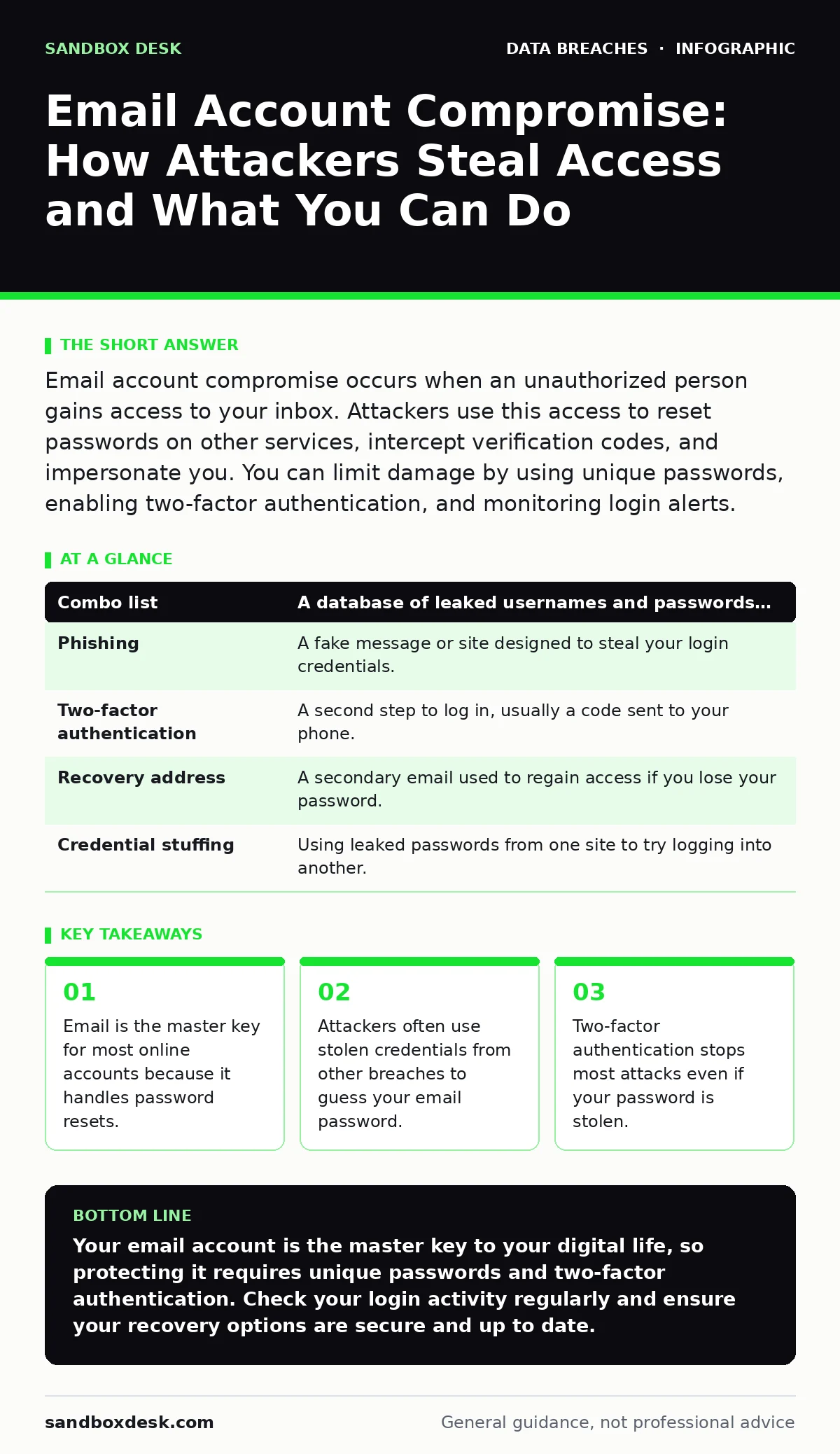
Email account compromise occurs when an unauthorized person gains access to your inbox. Attackers use this access to reset passwords on other services, intercept verification codes, and impersonate you. You can limit damage by using unique passwords, enabling two-factor authentication, and monitoring login alerts.
The House Key Analogy
Imagine your email account is the front door to your house. You keep spare keys for your car, your office, and your storage unit in a locked box inside that house. If a burglar picks the lock on the front door, they do not just steal what is in the living room. They walk to the closet, take the box, and now they have copies of every other key you own. They can open your bank account, your social media, and your work systems without ever picking those specific locks again.
This is why email compromise is more dangerous than a single locked door being forced open. It is not just about losing private messages. It is about losing the ability to verify who you are across the entire internet. Most services use your email address as the primary method to prove your identity when you forget a password.
How the Break-In Happens
Attackers rarely hack the email provider directly. Instead, they look for weak points in how you manage access. They might find your password on a combo list, which is a database of usernames and passwords leaked from other websites. If you reuse the same password for your email and a small forum, the attacker tries that forum password on your email. It works.
Another common method is phishing. This is a deceptive message that looks like it comes from a trusted source, asking you to click a link and enter your credentials. The link leads to a fake login page that looks identical to the real one. When you type your password, you are handing it directly to the attacker.
The Chain Reaction
Once inside your inbox, the attacker’s first move is usually stealth. They check for messages containing verification codes or password reset links. They might also look for sent messages to understand who you trust. If they see you frequently email your boss or your bank, they can craft messages that look like they come from you, asking for sensitive information or money.
This is where the concept of identity theft protection becomes relevant, but not in the way most people think. Buying a monitoring service does not stop the breach. It only alerts you after the damage is done. The real protection is making it harder for the attacker to move from the email to your other accounts. If your email is compromised, your digital identity is at risk of being fully assumed by someone else.
Why Recovery Is Hard
Resetting your email password is not enough if the attacker has already changed your recovery options. Most email services allow you to add a recovery phone number or a secondary email address. An attacker will add their own phone number and remove yours. Now, even if you remember your password, you cannot get back in because the service sends the reset code to the attacker’s phone.
This is why backup data exposure matters. If you have old backups of your email on a hard drive or cloud service, they might contain sensitive information that helps the attacker impersonate you more convincingly. It also means you need to audit what data you have stored and where, a process known as data inventory and mapping. Knowing where your digital keys are stored helps you secure them.
Term | Plain meaning
| Combo list | A database of leaked usernames and passwords from other breaches. |
|---|---|
| Phishing | A fake message or site designed to steal your login credentials. |
| Two-factor authentication | A second step to log in, usually a code sent to your phone. |
| Recovery address | A secondary email used to regain access if you lose your password. |
| Credential stuffing | Using leaked passwords from one site to try logging into another. |
See also: Email Encryption Protocols: How TLS and S/MIME Actually Work · Whaling Attacks: Spotting the Subtle Signs That Bypass Filters
Simple Safety Habits
You do not need expensive software to protect your email. You need disciplined habits. The most effective step is enabling two-factor authentication. This requires a second piece of information, like a code from an app on your phone, to log in. Even if the attacker has your password, they cannot get in without your phone.
Use a password manager to generate unique, complex passwords for every account. This ensures that if one site is breached, your email password remains safe. Never reuse passwords. If you do, a breach on a low-security site becomes a breach on your high-security email.
Try This Now
- Check your email security settings. Ensure two-factor authentication is turned on and that the recovery phone number is yours.
- Review recent login activity. Most email providers show a list of devices and locations that have accessed your account. If you see anything unfamiliar, change your password immediately.
- Search for your email address on breach notification sites. If your email appears in a known breach, change that password right away, even if you think it is strong.
The Human Element
Technology alone cannot stop every attack. Attackers often target the people around you. This is called doxxing, where an attacker publishes your private information online to harass or intimidate you. If your email is compromised, an attacker might use your sent folder to find friends and family, then send them messages pretending to be you.
This is why data subject rights matter. You have the right to know what data organizations hold about you and to request its deletion. The less personal data floating around the internet, the harder it is for attackers to build a profile of you.
Key takeaways
- Email is the master key for most online accounts because it handles password resets.
- Attackers often use stolen credentials from other breaches to guess your email password.
- Two-factor authentication stops most attacks even if your password is stolen.
Your email account is the master key to your digital life, so protecting it requires unique passwords and two-factor authentication. Check your login activity regularly and ensure your recovery options are secure and up to date.
Frequently asked questions
How do I know if my email has been compromised?
Look for unexpected password change notifications, missing emails, or login alerts from unknown locations. If you cannot log in, your recovery options may have been changed.
Is two-factor authentication enough?
It stops most automated attacks, but it does not protect you from phishing if you type the code into a fake site. Always check the URL before entering any codes.
Should I use a single password for everything?
No. If one site is breached, attackers will try that password on your email and other accounts. Use a password manager to keep them unique.
What if I think I clicked a phishing link?
Change your password immediately and enable two-factor authentication if you have not already. Check your sent folder for any messages you did not write.
How this guide was produced: written by the Sandbox Desk editorial team with AI assistance, checked against the public references listed below, and reviewed when the facts change. See our editorial policy or report an error.