Vendor Email Compromise Mistakes That Leave Your Accounts Open
Most vendor account takeovers happen because you verify identity through channels the attacker already controls, not because your passwords are weak.
You likely fall for vendor email compromise by trusting reply-to headers, using shared login credentials, and ignoring out-of-band verification. Attackers exploit these gaps to reset passwords and access your data. The fix requires strict identity verification protocols that do not rely on the compromised email channel itself.
Mistake 1: Trusting the Reply-To Header
You assume the sender is legitimate because the email address matches the vendor you know. Attackers craft messages that appear to come from a trusted domain. They manipulate the Reply-To field to route your response to their server. Your email client displays the familiar vendor name in the "From" line. The actual recipient address differs from the vendor's official domain. You send sensitive data or click a malicious link before noticing the discrepancy.
Why it hurts:
The attacker gains immediate access to the data you intended for the vendor. They may harvest credentials, financial details, or internal network information. The compromise happens silently because the visual cues in your inbox suggest safety. You lose trust in the vendor relationship and potentially face regulatory penalties for data exposure. The damage occurs before you realize the communication channel was hijacked.
The fix:
Verify the sender's address against the vendor's official contact page. Do not rely on the display name or the visual layout of the email. Copy the email address and compare it character by character with the known good address. Use a separate browser window to navigate to the vendor's portal directly. Never reply to an unsolicited request for credentials or payment changes. Treat every email as untrusted until verified through a secondary channel.
Mistake 2: Using Shared Administrative Credentials
You create a single username and password for multiple team members to access a vendor portal. This simplifies onboarding and reduces the administrative burden of managing individual accounts. It also creates a massive security liability. When one employee leaves or their device is compromised, the credential remains valid for all other users. The attacker gains full access to the account without needing to bypass multi-factor authentication for each user.
Why it hurts:
The attacker inherits the privileges of every user who has ever used that account. They can view, modify, or delete data across the entire organization. You cannot track which specific user performed an action because the audit logs show only the shared identity. Rotating the password disrupts business operations and may lock out legitimate users. The lack of individual accountability makes forensic analysis impossible after a breach.
The fix:
Assign unique credentials to every individual who needs access. Enforce multi-factor authentication for each account. Use an identity provider that supports single sign-on to manage access centrally. This allows you to revoke access immediately when an employee leaves. Audit logs will show exactly who performed each action. The initial setup effort is higher, but the long-term security posture is significantly stronger.
Mistake 3: Ignoring Out-of-Band Verification Requests
You receive an email requesting a password reset or a change in billing details. You comply because the email appears to come from the vendor. The attacker has already compromised the vendor's support queue or spoofed the email address. They know your username and have triggered a reset link that arrives in your inbox. You click the link and enter your new password, believing you are securing your account.
Why it hurts:
The attacker intercepts the reset link or the new password you set. They now have full control of your account. The vendor's security measures failed to detect the anomaly because the reset process itself is legitimate. You lose access to critical services and may face financial loss if the attacker changes billing information. The compromise is complete because you validated the attacker's request through the same compromised channel.
The fix:
Verify any request for sensitive changes through a separate communication channel. Call the vendor using a phone number from their official website or your existing contract. Do not use phone numbers provided in the suspicious email. Confirm the request with a human representative before taking any action. This step adds friction but prevents account takeover. The extra minute of verification saves hours of remediation.
Mistake 4: Overlooking Domain Similarity in URLs
You click a link in an email that leads to a login page. The URL looks almost identical to the vendor's official site. The attacker registered a domain with a slight typo or different top-level domain. The login page is a pixel-perfect replica of the vendor's interface. You enter your credentials, believing you are authenticating with the legitimate service. The browser may even show a secure connection icon if the attacker obtained a valid certificate.
Why it hurts:
The attacker captures your username and password in real-time. They may also capture multi-factor authentication codes if the phishing page prompts for them. You are now locked out of your account as the attacker logs in and changes your password. The vendor's security team may not detect the intrusion immediately. You face the cost and effort of resetting credentials across all systems where you reused that password.
The fix:
Hover over links before clicking to verify the destination URL. Compare the domain name carefully with the vendor's known address. Look for subtle differences in spelling or structure. Use a bookmark for frequently accessed vendor portals to avoid typing URLs manually. Enable browser extensions that warn about known phishing domains. Treat any unsolicited link as suspicious, regardless of how authentic it appears.
Mistake 5: Failing to Rotate Credentials After Staff Departure
An employee leaves the company, but their access to vendor accounts remains active. You assume the vendor portal is secure because the employee no longer has a company email address. The attacker may have previously compromised the employee's device or account. They now use the lingering credentials to access the vendor portal. The account remains active because no one audited the access rights after the departure.
Why it hurts:
The attacker gains unauthorized access to your vendor account. They can exfiltrate data, make purchases, or alter configurations. You may not detect the intrusion for weeks or months. The lack of timely credential rotation creates a persistent vulnerability. The attacker exploits the gap between the employee's departure and the eventual discovery of the breach. The damage compounds as the attacker has more time to operate undetected.
The fix:
Implement a strict offboarding process that includes revoking all vendor access. Update access rights immediately when an employee leaves. Use an identity management system to automate this process. Conduct regular audits to identify and remove dormant accounts. This ensures that former employees cannot be used as entry points. The discipline of immediate revocation protects against both insider threats and external attackers.
See also: Email Account Compromise: How Attackers Steal Access and What You Can Do · Whaling Attacks: Spotting the Subtle Signs That Bypass Filters
Mistake 6: Disabling Multi-Factor Authentication for Convenience
You disable multi-factor authentication on a vendor account because it slows down your workflow. The authentication process requires an extra step that feels unnecessary for a low-risk service. The attacker obtains your password through phishing or a data breach. They bypass the login screen because there is no second factor to verify your identity. The convenience you gained becomes the vector for a complete account takeover.
Why it hurts:
The attacker gains full access to your account with only your password. They can change settings, access data, and perform actions as if they were you. The lack of multi-factor authentication removes the primary defense against credential theft. You may not realize the account is compromised until significant damage has occurred. The convenience of a faster login is outweighed by the risk of total loss of control.
The fix:
Enable multi-factor authentication on every account that holds sensitive data. Use an authenticator app or hardware token instead of SMS, which can be intercepted. Configure multi-factor authentication to require verification for new devices or locations. Accept the minor inconvenience as a necessary cost of security. This single measure dramatically reduces the risk of account compromise. The effort to set it up is minimal compared to the cost of recovery.
Mistake 7: Relying on Email Security Filters Alone
You trust your email security filters to block all phishing attempts. The filters catch many obvious threats but miss sophisticated attacks. The attacker uses a legitimate-looking email from a trusted domain that has been compromised. The filter allows the email through because it does not match known malicious patterns. You open the email and fall for the social engineering attack. The reliance on automated filters creates a false sense of security.
Why it hurts:
The attacker bypasses your technical defenses and targets your human judgment. You may click a link or download an attachment that installs malware. The compromise spreads through your network as the attacker leverages your credentials. The filters provide no protection against social engineering. You face the cost of incident response and potential data loss. The assumption that technology alone can prevent phishing is dangerous.
The fix:
Combine technical controls with user training and awareness. Teach your team to recognize the signs of phishing, such as urgency or unusual requests. Encourage a culture of skepticism where employees feel comfortable reporting suspicious emails. Use deception technology to detect attacks in real-time. Regular testing with simulated phishing campaigns helps reinforce good habits. Technology and human vigilance must work together to stop sophisticated attacks.
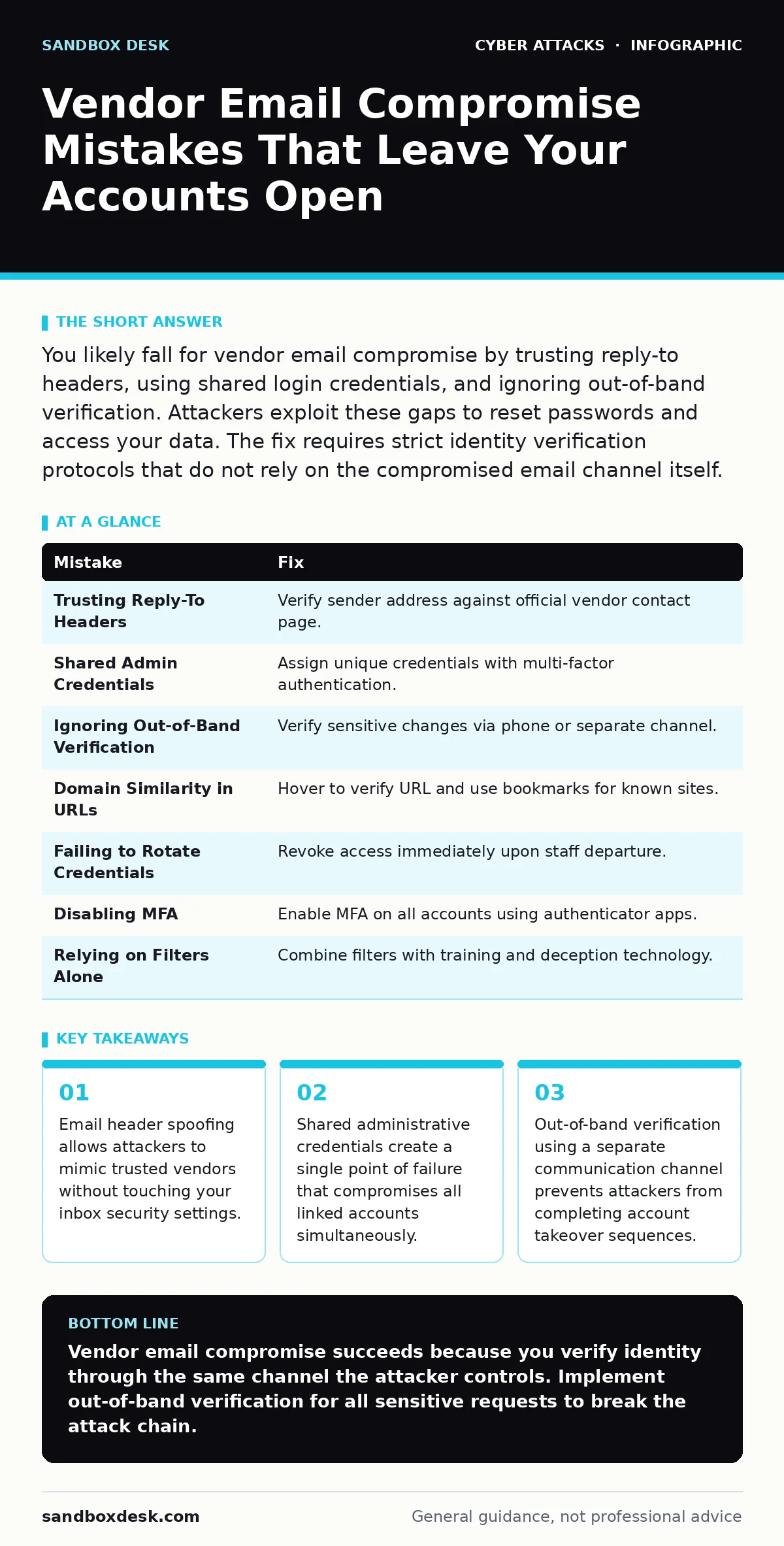
| Mistake | Fix |
|---|---|
| Trusting Reply-To Headers | Verify sender address against official vendor contact page. |
| Shared Admin Credentials | Assign unique credentials with multi-factor authentication. |
| Ignoring Out-of-Band Verification | Verify sensitive changes via phone or separate channel. |
| Domain Similarity in URLs | Hover to verify URL and use bookmarks for known sites. |
| Failing to Rotate Credentials | Revoke access immediately upon staff departure. |
| Disabling MFA | Enable MFA on all accounts using authenticator apps. |
| Relying on Filters Alone | Combine filters with training and deception technology. |
Key takeaways
- Email header spoofing allows attackers to mimic trusted vendors without touching your inbox security settings.
- Shared administrative credentials create a single point of failure that compromises all linked accounts simultaneously.
- Out-of-band verification using a separate communication channel prevents attackers from completing account takeover sequences.
Vendor email compromise succeeds because you verify identity through the same channel the attacker controls. Implement out-of-band verification for all sensitive requests to break the attack chain.
Frequently asked questions
How do I know if my vendor account has been compromised?
Check for unauthorized changes in settings, unexpected invoices, or login alerts from unknown devices. Contact the vendor immediately if you suspect a breach.
Can multi-factor authentication be bypassed?
Yes, through social engineering or session hijacking, but it significantly raises the barrier for attackers. Use hardware tokens for the highest level of protection.
What is out-of-band verification?
It is verifying a request through a different communication channel, such as a phone call, rather than replying to the suspicious email.
Should I use the same password for all vendor accounts?
No, use unique passwords for each account to prevent a breach in one service from compromising others.
How this guide was produced: written by the Sandbox Desk editorial team with AI assistance, checked against the public references listed below, and reviewed when the facts change. See our editorial policy or report an error.