Kerberoasting Mistakes That Expose Service Accounts
Service accounts with weak encryption settings allow attackers to request and crack tickets offline without triggering immediate detection alerts.

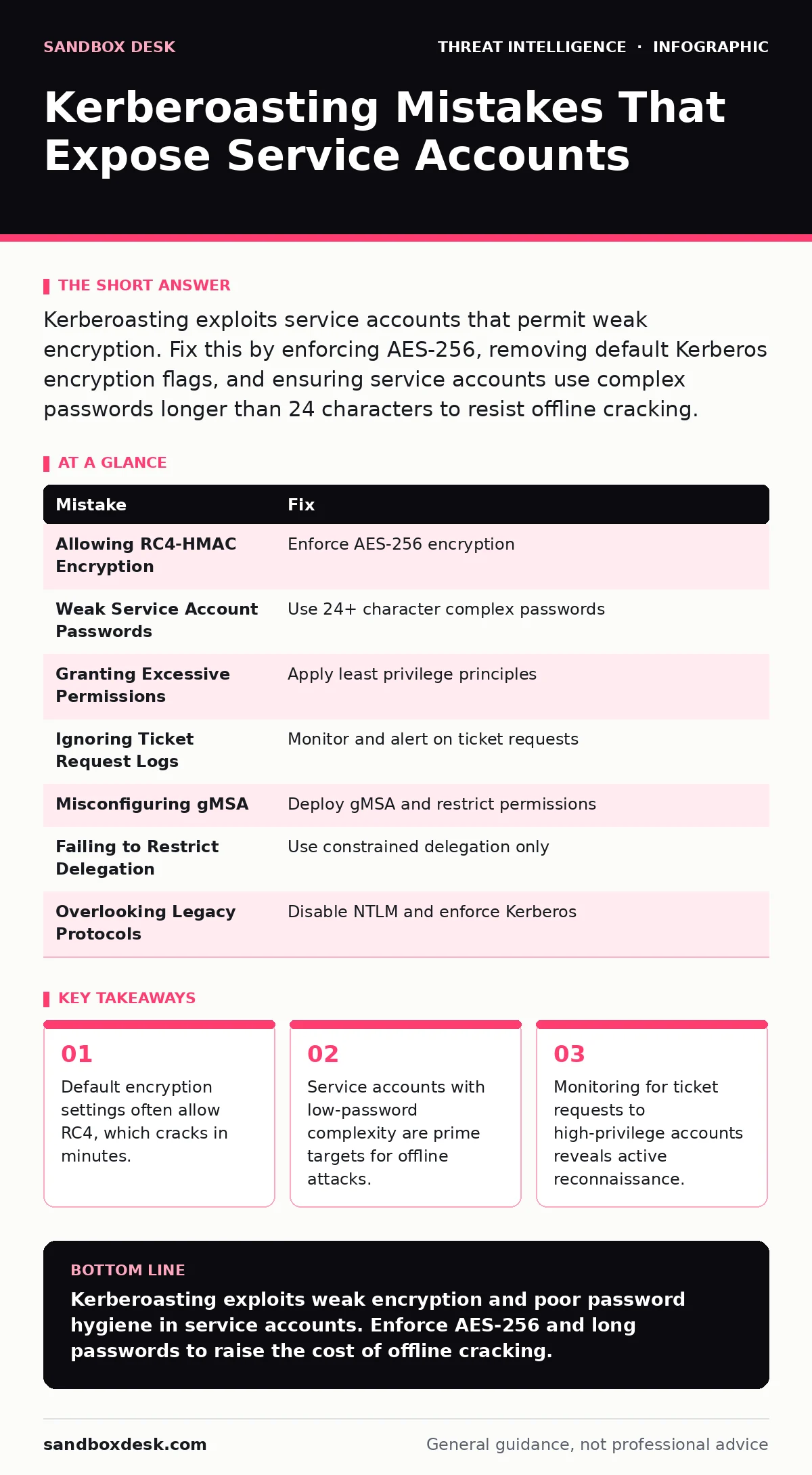
Kerberoasting exploits service accounts that permit weak encryption. Fix this by enforcing AES-256, removing default Kerberos encryption flags, and ensuring service accounts use complex passwords longer than 24 characters to resist offline cracking.
Mistake 1: Allowing RC4-HMAC Encryption
Kerberos supports multiple encryption types. Older systems default to RC4-HMAC, a weak algorithm. Attackers request a ticket for a service account. The domain controller issues the ticket encrypted with the service account’s password hash. If RC4 is allowed, the attacker extracts the ticket and cracks it offline. Modern hardware breaks RC4 hashes rapidly. This exposes the service account password. You lose access to the service and any systems it touches.
Why it hurts: RC4 is computationally weak. An attacker does not need to interact with the domain controller after the initial request. The cracking happens on their local machine. This bypasses network defenses and account lockout policies. The service account is compromised before you notice any failed login attempts.
The fix: Disable RC4-HMAC encryption for all service accounts. Force AES-256 or AES-128. Use Group Policy Object to set the minimum encryption type. Verify the change by checking the userAccountControl attribute. Ensure no legacy systems require RC4. If they do, isolate them or replace them. AES encryption makes offline cracking significantly harder.
Mistake 2: Weak Service Account Passwords
Service accounts often have simple passwords. Administrators create them once and forget them. Short passwords are easy to guess. Long, complex passwords resist brute-force attacks. Kerberoasting relies on offline cracking. The strength of the password determines the time required to crack it. A 12-character password with mixed types might take hours. A 24-character password with high entropy takes years. Weak passwords make the attack trivial.
Why it hurts: The attacker already has the ticket. They only need to solve the cryptographic puzzle. A weak password reduces the search space. The attacker recovers the plaintext password quickly. They can then authenticate to any system the service account accesses. This includes file shares, databases, and application servers. The breach expands rapidly from a single account.
The fix: Enforce long, complex passwords for all service accounts. Use a minimum length of 24 characters. Avoid dictionary words and common patterns. Rotate passwords regularly, though length is more important than rotation frequency. Use a password manager to store these credentials securely. Ensure application configurations accept long passwords without truncation.
Mistake 3: Granting Excessive Permissions
Service accounts often have more rights than needed. They are added to local administrator groups on multiple servers. They have read access to sensitive shares. This violates the principle of least privilege. When a service account is compromised, the attacker inherits all its permissions. They can move laterally across the network. They can escalate privileges to domain admin. The damage is proportional to the permissions granted.
Why it hurts: The attacker does not need to exploit additional vulnerabilities. The service account provides direct access. They can install malware, create backdoors, and exfiltrate data. The scope of the breach is defined by the account’s rights. High-privilege service accounts are high-value targets. Compromising one gives the attacker a foothold in critical infrastructure.
The fix: Audit service account permissions regularly. Remove unnecessary group memberships. Use managed service accounts where possible. These accounts handle password rotation automatically. They limit the scope of the account to specific services. Restrict file share access to only what the service needs. Monitor for permission changes to detect abuse.
Mistake 4: Ignoring Ticket Request Logs
Kerberoasting starts with a ticket request. The attacker queries the domain controller for a ticket. This generates a log entry. Many organizations do not monitor these logs. They focus on failed logins or suspicious processes. Ticket requests are considered normal activity. This blind spot allows attackers to enumerate service accounts. They identify high-value targets before attempting the attack. Silence is not safety.
Why it hurts: The attacker gains intelligence without triggering alerts. They map the service accounts in your environment. They prioritize accounts with weak encryption or low privileges. This reconnaissance phase is quiet. By the time you see the cracked password, the attacker is already inside. You miss the window for early detection.
The fix: Enable audit logging for Kerberos service ticket operations. Filter for requests for high-privilege accounts. Alert on multiple requests from a single user. Correlate ticket requests with subsequent access events. Use security information and event management tools to parse these logs. Baseline normal behavior to detect anomalies.
Mistake 5: Using Group Managed Service Accounts Incorrectly
Group Managed Service Accounts (gMSA) automate password management. They rotate passwords every 30 days. They are tied to specific computers. This reduces the risk of static passwords. However, misconfiguration can undermine this benefit. If gMSA is not enforced, administrators may revert to manual accounts. Or they may grant excessive permissions to the gMSA. The automation helps, but it does not fix poor design.
Why it hurts: Manual service accounts remain vulnerable if gMSA is not adopted. The administrator must still manage permissions. If the gMSA is added to too many groups, the blast radius increases. The automatic rotation does not stop lateral movement. The attacker still has valid credentials during the rotation window. The complexity of management increases without reducing risk.
The fix: Deploy gMSA for all applicable services. Ensure the service supports gMSA. Restrict the gMSA to the necessary computer accounts. Monitor the gMSA for permission changes. Do not use gMSA as a replacement for least privilege. It is a password management tool, not a security control.
See also: Scheduled Task Abuse Prevention Checklist for Secure Systems
Mistake 6: Failing to Restrict Delegation
Kerberos delegation allows a service to act on behalf of a user. Constrained delegation limits this to specific services. Unconstrained delegation allows the service to impersonate any user. Attackers exploit unconstrained delegation to escalate privileges. They compromise the service account and request tickets for domain admins. This bypasses the need to crack the admin password directly. It is a powerful escalation path.
Why it hurts: The attacker gains access to high-privilege accounts without cracking them. They use the compromised service account as a proxy. The ticket is issued by the domain controller, so it is valid. The attacker can access any system the domain admin can. This is similar to DCSync attacks in impact. The breach is immediate and severe.
The fix: Disable unconstrained delegation. Use constrained delegation instead. Limit the services the account can impersonate. Audit delegation settings regularly. Ensure no service accounts have unnecessary delegation rights. Monitor for changes to delegation configurations.
Mistake 7: Overlooking Legacy Protocol Support
Older protocols like NTLM are often enabled for compatibility. NTLM is weaker than Kerberos. Attackers may use NTLM relay attacks to bypass authentication. They capture the NTLM hash and relay it to another server. This allows them to authenticate without knowing the password. Kerberoasting and NTLM relaying often occur together. Defending against one does not stop the other.
Why it hurts: The attacker has multiple paths to compromise. Disabling Kerberos weaknesses does not help if NTLM is open. The relay attack is fast and silent. It exploits the trust between systems. The attacker gains access to resources without cracking any hashes. The defense gap is wide.
The fix: Disable NTLM where possible. Enforce Kerberos for all internal communications. Use channel binding to prevent relay attacks. Monitor for NTLM authentication attempts. Block NTLM from untrusted networks. Ensure all systems support modern authentication protocols.
| Mistake | Fix |
|---|---|
| Allowing RC4-HMAC Encryption | Enforce AES-256 encryption |
| Weak Service Account Passwords | Use 24+ character complex passwords |
| Granting Excessive Permissions | Apply least privilege principles |
| Ignoring Ticket Request Logs | Monitor and alert on ticket requests |
| Misconfiguring gMSA | Deploy gMSA and restrict permissions |
| Failing to Restrict Delegation | Use constrained delegation only |
| Overlooking Legacy Protocols | Disable NTLM and enforce Kerberos |
Key takeaways
- Default encryption settings often allow RC4, which cracks in minutes.
- Service accounts with low-password complexity are prime targets for offline attacks.
- Monitoring for ticket requests to high-privilege accounts reveals active reconnaissance.
Kerberoasting exploits weak encryption and poor password hygiene in service accounts. Enforce AES-256 and long passwords to raise the cost of offline cracking.
Frequently asked questions
How do I check if a service account is vulnerable to Kerberoasting?
Check the msDS-SupportedEncryptionTypes attribute. If it includes RC4, the account is vulnerable. Also check the password length and complexity.
Can I prevent Kerberoasting without changing passwords?
No. The password strength determines the time to crack. Weak passwords will always be vulnerable to offline cracking, regardless of other controls.
Does MFA protect against Kerberoasting?
No. Kerberoasting targets service accounts that do not use MFA. The attack relies on the service account’s password hash, not interactive login.
How often should I rotate service account passwords?
Rotate regularly, but focus on length and complexity. A long, complex password rotated yearly is safer than a short password rotated monthly.
How this guide was produced: written by the Sandbox Desk editorial team with AI assistance, checked against the public references listed below, and reviewed when the facts change. See our editorial policy or report an error.